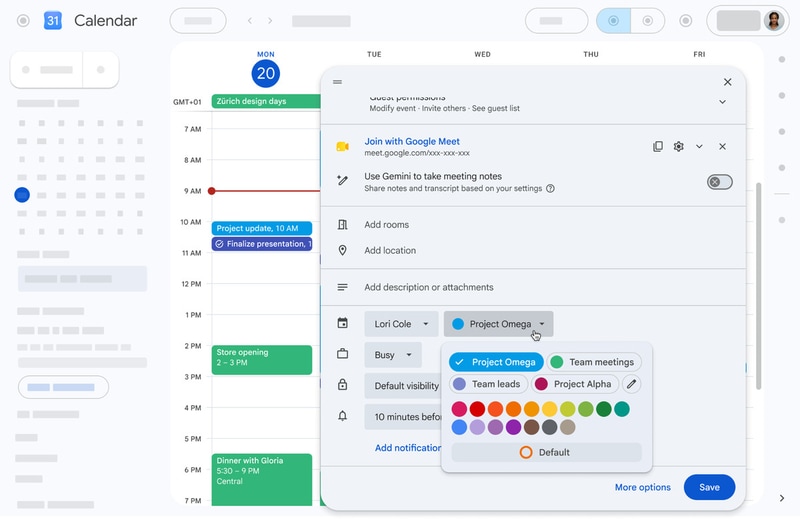
Personalized calendar interfaces are making digital scheduling more flexible by giving users greater control over how they visually organize their time. Google Calendar now supports up to 200 custom colors for individual events, replacing its long-standing limitation of 11 preset options. Users can choose from 24 default colors or create additional shades using a full RGB color picker on the web, with support extending across the mobile apps and the Calendar API. The expanded palette allows both personal and business users to build more customized organizational systems that reflect different priorities, projects, or workflows.
For productivity software providers, deeper personalization features can improve user engagement by making everyday tools more adaptable to individual preferences. Enhanced visual organization also benefits teams that manage complex schedules, helping users quickly identify event categories and priorities. As workplace and personal planning become increasingly digital, personalized calendar interfaces can strengthen platform loyalty by delivering a more intuitive and customizable scheduling experience.
Image Credit: Google
What Makes This Trend Stand Out
- Customizable Productivity Interfaces
- Greater control over visual layouts creates space for productivity platforms that adapt to individual work styles, cognitive preferences, and task prioritization systems.
- Color-coded Workflow Management
- Visual scheduling tools with expanded color options support more nuanced project tracking, enabling teams to simplify complex coordination across roles, deadlines, and priorities.
- Personalized Digital Organization
- As users expect everyday software to reflect personal habits, flexible organization features can differentiate platforms through more intuitive and loyalty-building experiences.
Sectors Adopting This
- Productivity Software
- Deeper personalization within core planning tools presents opportunities for software providers to increase engagement through interfaces that feel more responsive to user behavior.
- Workplace Collaboration
- Team-based scheduling systems can benefit from richer visual categorization that improves shared visibility, faster context recognition, and cross-functional planning clarity.
- Calendar Technology
- Expanded API-supported customization opens new possibilities for calendar ecosystems that connect personalized scheduling preferences across apps, devices, and enterprise workflows.