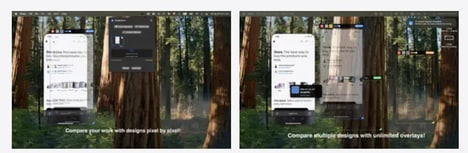

Identifying small differences between a live website and its original design can be time-consuming, particularly when teams are relying on screenshots, messages, or manual comparisons. DesignQA is a design quality assurance tool built to make reporting UI bugs and visual mismatches faster. Users can click on individual elements to identify issues and compare live website elements against their Figma designs.
The platform makes it easier to spot differences in layouts, styling, spacing, and other visual details that may otherwise be missed during development. Once an issue is identified, users can share a link with suggested fixes, giving designers and developers a clearer reference for what needs to change. This creates a more direct workflow between identifying a design problem and communicating it to the person responsible for fixing it. DesignQA is designed to help teams reduce back-and-forth during QA and ensure that finished websites more closely match their intended designs.
Image Credit: DesignQA
Key Themes Behind This Trend
- Visual QA Automation
- Automated comparison between live interfaces and design files creates space for faster defect detection, reducing reliance on manual reviews and fragmented feedback loops.
- Design-to-code Validation
- Pixel-level checks against original design intent highlight a growing need for tools that close the gap between creative specifications and production implementation.
- Collaborative Bug Reporting
- Shared links with contextual fixes reflect emerging demand for clearer, more actionable communication between designers, developers, and QA teams.
Where This Applies
- Web Development
- Website production workflows are being reshaped by tools that embed visual accuracy checks directly into the build and review process.
- Software Quality Assurance
- QA practices are expanding beyond functional testing as visual consistency, layout precision, and brand fidelity become measurable review criteria.
- Design Software
- Design platforms and adjacent tools are evolving into connected ecosystems where design files serve as live references for implementation quality.