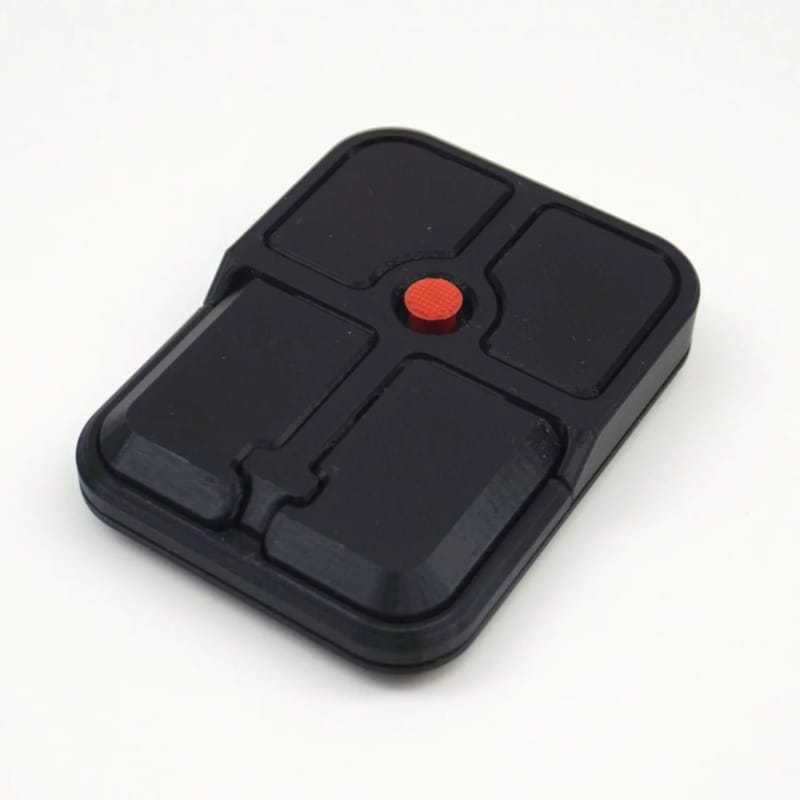
The Ploopy Bean is a compact desktop pointing device built around a pressure-sensitive TrackPoint nub instead of traditional optical tracking. The device allows users to control the cursor through directional force applied to the central red nub, removing the need to move the mouse across a surface. Its rounded body places left and right click buttons directly beside the controller, enabling one-handed use with minimal wrist movement. The layout adapts the familiar laptop input method into a standalone peripheral.
The Bean mouse concept features a matte black enclosure with additional side controls for scrolling and navigation. Its symmetrical design supports both left- and right-handed users, while the compact footprint keeps it suited for small workspaces. The device focuses on stationary interaction, using pressure input rather than motion to handle cursor control.
Image Credit: Ploopy
Key Themes Behind This Trend
- Pressure-based Pointing Interfaces
- A transition from motion-tracking to force-sensitive inputs enables cursor control through directional pressure, reducing reliance on surface movement for precise navigation.
- One-handed Ergonomic Peripherals
- Compact layouts that cluster primary controls around a central nub promote single-handed operation and minimize wrist travel for extended desktop use.
- Stationary Cursor Interaction
- Devices designed for fixed-position use prioritize localized input mechanisms and small footprints to suit constrained workspaces and standing or seated setups.
Where This Applies
- PC Peripherals
- Peripheral makers can explore novel form factors that replace traditional optical mice with tactile, pressure-driven controllers for niche and mainstream markets.
- Assistive Technology
- Adaptive input technologies that rely on force rather than movement offer alternative access methods for users with limited arm mobility or repetitive-strain concerns.
- Workspace and Furniture Design
- Compact input devices influence desk layouts and product ecosystems by enabling denser, more ergonomic workstation arrangements tailored to small or shared environments.