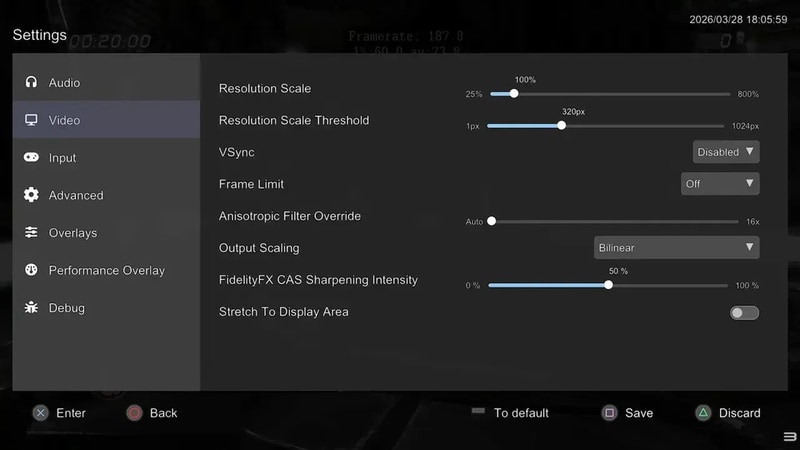
RPCS3, the open-source PlayStation 3 emulator, released an updated in-game overlay designed for handheld PCs, featuring a controller-friendly UI that mirrors SteamOS and surfaces common controls while a game runs. The overlay is accessed via Start + Select and offers immediate tools such as screenshots, save states and quick restart alongside a consolidated settings menu with key graphics toggles.
Developers also exposed resolution scaling and a framerate limiter directly in the overlay so users can adjust visuals and performance without quitting a session. The refresh includes an optional performance overlay for live framerate metrics and support for more advanced options; some complex settings still rely on desktop tooltips for clarity. For Steam Deck and similar devices this makes tuning PS3 emulation far more approachable, reducing friction for handheld retro play and aligning emulator UX with modern portable gaming workflows.
Image Credit: RPCS3 Team
What Makes This Trend Stand Out
- Handheld-friendly UI Overlays
- A controller-optimized overlay that surfaces common controls and settings during play opens avenues for seamless, context-aware interfaces on compact devices.
- In-session Performance Tuning
- Live access to resolution scaling and framerate limiting within active sessions enables dynamic quality-performance tradeoffs that change user expectations for real-time optimization.
- Retro Emulation Accessibility
- Simplifying complex emulator workflows for portable platforms reduces barriers to entry and reframes retro gaming as a mainstream, on-the-go entertainment category.
Sectors Adopting This
- Portable Gaming Hardware
- Devices like the Steam Deck benefiting from integrated overlays suggest hardware designs could prioritize native input mappings and thermal headroom for sustained emulator performance.
- Game Emulation Software
- Emulators exposing critical graphics and performance controls in-app imply a shift toward more user-centric, feature-rich frontend experiences for legacy game preservation.
- Cloud Gaming Services
- Streaming platforms that incorporate low-latency overlays and remote performance telemetry could redefine expectations around playable fidelity and adaptive streaming on mobile form factors.