

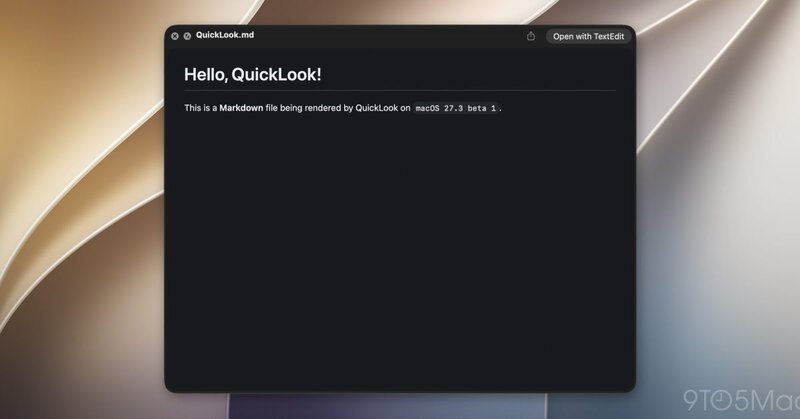
Apple is making it easier to read a certain type of text file on Mac computers with an update to Quick Look in the macOS 27.3 beta. The feature lets users open Markdown files and see them as neatly formatted documents, with clear headings, lists and links, rather than a page of symbols and code-like text.
Markdown is a simple way of formatting written content without using a traditional word processor. It's often used for notes, instructions and online documents, including files that tell AI tools how to work. Until now, Mac users who wanted to see how these files looked had to open them in a separate app.
The update brings that viewing option directly into macOS, making it quicker to check documents without switching between apps. It also builds on Apple's existing support for Markdown in Notes, which already allows users to import and export files in the format.
Image Credit: 9to5Mac
Why This Trend Is Growing
- Native Markdown Preview
- Built-in rendering of lightweight document formats creates room for operating systems to absorb workflows once handled by niche productivity apps.
- Frictionless File Inspection
- Instantly readable previews reduce app switching and highlight demand for context-aware file experiences across professional desktops.
- AI-ready Documentation
- Clearer access to instruction files and structured notes supports growing enterprise reliance on human-readable formats for AI configuration and collaboration.
Industries Being Reshaped
- Operating Systems
- Deeper file preview capabilities signal a shift toward platforms embedding specialized productivity functions directly into core user experiences.
- Productivity Software
- Markdown support inside default tools pressures standalone editors to differentiate through advanced collaboration, automation and publishing features.
- Developer Tools
- Improved visibility for technical documentation expands opportunities around simplified workflows for coding teams, AI prompt files and repository management.